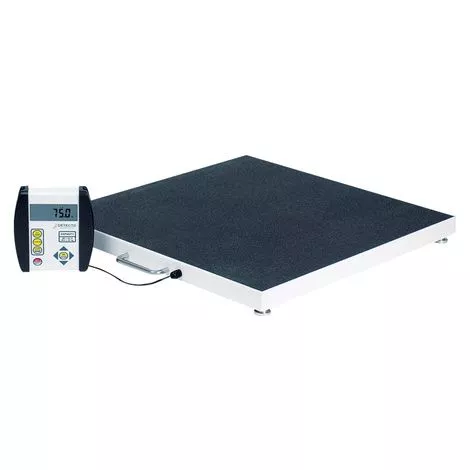
Features
- Detecto Digital Bariatric Portable Floor Scale comes with 10-foot long cable from indicator to the scale
- Light weight design, battery power and carrying handles make it ultra portable for convenient weighing wherever needed
- Low profile platform provides easy access for weighing
- Indicator may be mounted on a wall or desk for easy viewing
- Skid-proof and soft, durable black rubber mat
- Body mass index calculator with scroll feature to input height, which allows the ease of BMI calculation while weighing
- Integral Carrying Handle
- EMR/EHR Ready
- Can be used for every patient type from child to bariatric
- Operating Instructions
More Information
- Operating Instructions:
– Scale Preparation:
1. Install six (6) “AA” size batteries or if ordered with scale, plug the small connector end of the AC power adapter cord into the power jack located in the bottom right corner at the back of the indicator and then plug the AC power adapter into the proper electrical outlet.
– Important: DO NOT connect an AC power adapter to the indicator if alkaline batteries are installed.
2. Install the indicator on the scale bracket and then connect the load cell cable. 3. Place the scale on any hard, level, flat surface or low-cut carpet.
4. The scale is now ready for operation. - Basic Operation:
- – To Weigh:
1. Press the ON/OFF key to turn the indicator on.
2. Press the ZERO key to zero weight display. The ZERO and lb or kg annunciator will turn on to show that the scale is ready for use.
3. Assist patient onto scale and read weight display.
4. If a printer is connected to scale, press the (Down Arrow/Print) key to print a ticket.
5. Assist patient off scale.
– Zero Weight Display:
1. If the indicator is not showing zero weight on the display, press the ZERO key.
2. Weight display will return to zero. The ZERO, STABLE and lb or kg annunciators will turn on to show a stable, center-of-zero weight condition.
– Metric Conversion:
Press the UNITS key to toggle between pounds and kilograms. The lb or kg annunciator will turn on to show the weighing unit selected.