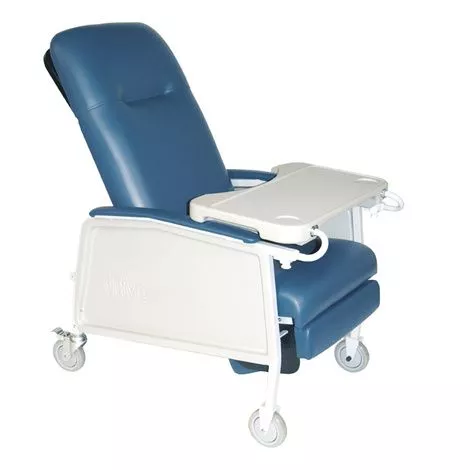
Drive Medical 3-Position Recliner Features
- 3-positions: upright , deep recline, and elevated leg rest/footrest
- Retractable lock bar secures the medical chair in the desired position
- Self-adjusting suspension in the seat prevents bottoming out
- Side panels “pop-off” for easy cleaning and maintenance
- Large, blow-molded tray locks in 5 positions and can be stored on the side of the chair 5″ casters (2 with locks) make it easy to move and secure the recliner
- Wide, comfortable armrests are angled to provide support in any reclined position
- The neutral-colored, sturdy steel frame is easy-to-clean and maintain
- Moisture barrier on seat prevents seepage
- Comfortable built-in headrest
- Foam and vinyl meet California Technical Bulletin 117
- Standard
User Manual of Drive 3 Position Geri-Chair Recliner
What to buy with Drive 3 Position Geri Chair Recliner
- Medline Double-Tread Slippers
- Anatomy Supply Bariatric Step Stool with Non-Slip Surface
How to operate Position Geri-Chair Recliner?
How to lock the Drive Medical Geri Chair?
- Adjust the recliner to your preferred spot.
- To remove the Lock bar from its stored location, pull out the Lock-Release Pull Button.
- Rotate the recliner Lock Bar down until the notches over the Locking Pins are completely engaged.
How to unlock 3 Position Recliner Chair?
- To disengage from the Locking Pins, raise the Lock Bar of the recliner.
- Rotate the recliner Lock Bar all the way up until it is full against the seat back while pushing the Lock-Release Pull Button out.
- To keep the recliner Lock Bar in the stored spot, release the Lock-Release Pull Button.
How to operate Driver Geri-Chair?
- Underneath each arm, pull down, and hold the pull button until it goes into place.
- Then, on both ends, slide the lockout keys forward.
- Pick up the table by the circular table arm and slightly slide the table into receiving tubing in front of each arm.
- By holding the lock/lockout key forward, the table can be slid on and off.
- One of five places on the table can be closed.Pull the pull button down and leave it in place when slipping the key backwards.
- Continue to the other arm and backwards-move the key. The table tray can now be locked.